
software
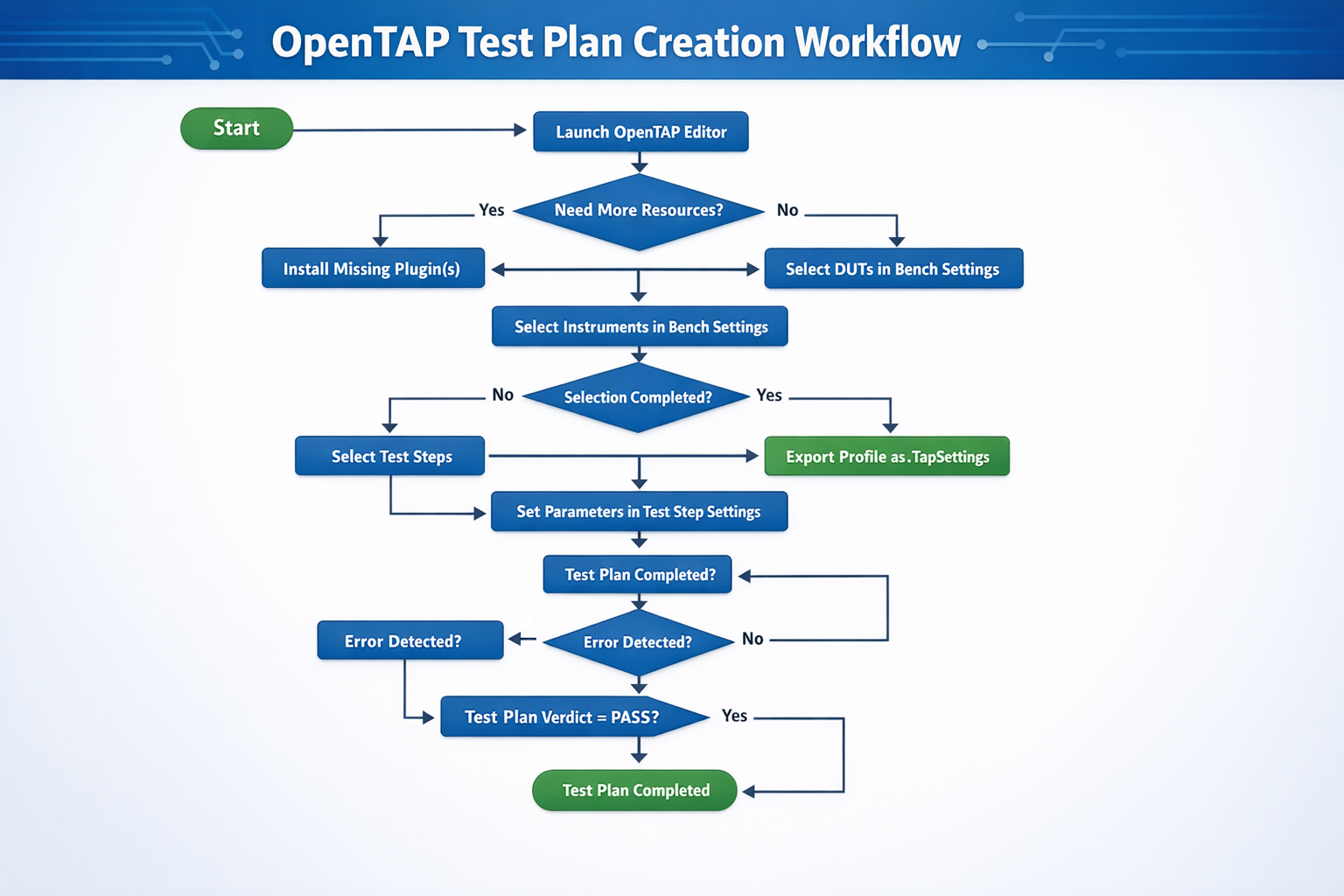
TestPlan Creation using OpenTAP Environment
Purpose
A DUT (Device Under Test) is validated using a test sequence, commonly referred to as a Test Plan. A test plan is a collection of test steps executed sequentially to validate the DUT and determine whether the product result is PASS or FAIL.
For the FTS (First Test Station) project, OpenTAP was selected as the test sequencer platform. OpenTAP is an open-source test automation environment that is free to download, install, and use.
The fundamentals of test plan creation are well explained in the OpenTAP blog: OpenTAP TestPlan Creation
.
Within the FTS project, the Keysight Editor with a community license was used to develop all test plans.
Because the project relies on test instruments such as oscilloscopes, DVMs, and power supplies, the preferred solution was an OpenTAP package provided by Keysight. This package includes instrument configuration and control, the OpenTAP software, the OpenTAP Package Manager, and the OpenTAP Editor for test plan creation under a community license.
For this purpose, the following software package was downloaded and installed: Test Automation Developer
.
Recommendations
Take the time to define a detailed test plan before starting to code in OpenTAP. Having a clear understanding of what the test sequence needs to accomplish will greatly facilitate development, validation, and long-term maintenance.
If external instruments are used, configure them first using Keysight Connection Expert or equivalent software. Verify that basic commands (for example,
*IDN?) return a valid response before integrating the instrument into an OpenTAP test plan.In OpenTAP, use unique names for each Test Step. Reusing the same name in multiple locations (for example, multiple steps named Delay) can cause confusion during test execution and in test reports.
DUTs (Device Under Test) must be defined for each product. The Device Name and Product Name are included in the test report. DUT definitions are provided through plugins, as no standard DUT definition exists in OpenTAP. However, the InterconnectIO plugin includes a preliminary definition for generic DUTs, which may be used if the project DUT is compatible.
Use a Serial Number to uniquely identify each DUT and to generate unique test reports. A Test Step available in the InterconnectIO plugin forces the operator to enter a serial number. This serial number can also be validated through the Test Step settings.
For each Test Step, replace the default description text in the Test Step settings with a custom, detailed explanation describing the purpose of the step. Over time, this documentation helps production operators understand how the product is tested and significantly assists with debugging defective units.
OpenTAP References & Examples
OpenTAP Test Plan Overview — description of test plans and XML structure.
OpenTAP Test Plan OverviewOpenTAP Test Plan Creation Tools — blog covering editors and workflows to build test plans.
OpenTAP Test Plan Creation ToolsOpenTAP Getting Started — official documentation for setup and basics.
OpenTAP Getting StartedAutomate Test Plans with PathWave Test Automation — workflow demo of test plan creation.
Automate Test Plans with PathWave Test Automation (YouTube)