
software
OpenTAP Operator GUI
Purpose
FTS Operator Graphical User Interface (GUI) is an open-source application designed to run OpenTAP TestPlans in a production environment. This Windows WPF application is intentionally simple, requiring minimal operator training.
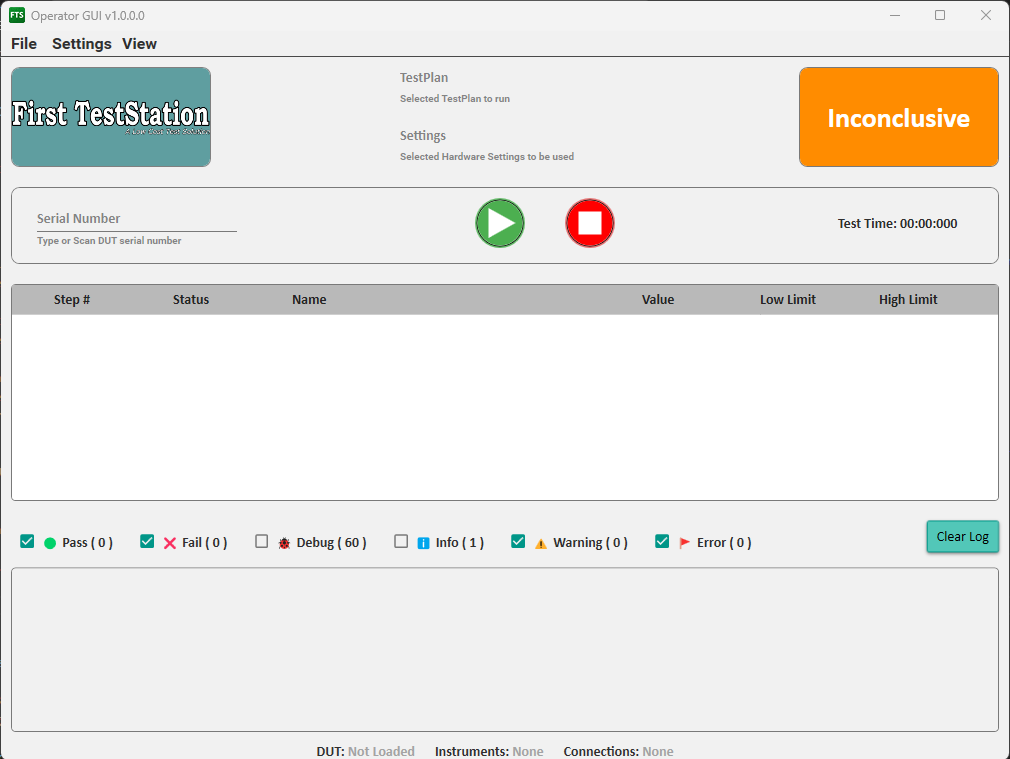
Operators can select the TestPlan to execute, start the test, and follow its progress in real time. The live log window displays OpenTAP output, and the Test Execution panel clearly indicates which steps pass and which fail.
Originally, the plan was to use the OpenTAP Keysight Test Automation Editor with the Community License to run the TestPlans associated with the First Test Station (FTS) project. However, the Keysight Editor is a development tool—not a production tool. While it is excellent for creating TestPlans or debugging defective DUTs (Devices Under Test), it is too flexible and complex for routine production use.
Based on my years of experience in production test engineering—and with the help of modern AI tools—the decision was made to create a dedicated operator-focused GUI. The result is a streamlined, production-ready application.
Designed primarily for the FTS project, most testing and validation has been performed using the custom InterconnectIO plugin developed for this environment. This application is open source and intended to help small businesses access better tools for production testing.
✨ Key Features
1. 🖼️ Modern User Interface (UI)
- Technology: Built on the Windows Presentation Foundation (WPF) framework
- Design: Designed using the popular Material Design in XAML library for a clean, modern, and professional aesthetic
- Themes: Themes: Modern color themes allow users to switch between light and dark backgrounds
2. 🧪 Test Execution Support
- Test Plan Selection (TapPlan): OpenTAP Test Plans, saved as
.TapPlanfiles, are the primary method used to select and initiate testing sequences - Configuration (TapSetting): The hardware environment and Device Under Test (DUT) configuration are dynamically defined by reading the associated TapSettings file, ensuring consistency across test runs
- Integration TapSettings can be integrated into TapPlan by using a special test step to load a single file (.TapPlan) that contains all information
3. 🏷️ Production Readiness & Traceability
- Serial Number Integration: The application strongly encourages the use of Serial Numbers, which serve as the key identifier for comprehensive production traceability and logging
- Plugin Validation: Automates test sequences, validates the presence of necessary OpenTAP plugins, and provides clear warnings to operators if required plugins are missing before execution begins
4. 📊 Real-time Monitoring
- Test Progress Tracking: Visual indicators show pass/fail status for each test step with detailed metrics including values and limit comparisons
- Result Summary: Clear pass/fail counters with debug, info, warning, and error message tracking. Real-time execution messages from OpenTAP listeners are sent to the status box where messages can be filtered by type
5. 🎨 Customization
- Dynamic Logo Loading: Allows integration of a custom Company Logo to visually associate the application with the manufacturing company
Plugin Location
The plugin source code is hosted on the official GitHub repository. In the future, the Operator_GUI plugin may also be made available directly through the OpenTAP Package Manager for easier installation and updates.